
Governing Cursor's New Environments API
Cursor's Environments API is in beta, with up to 300 repos per cloud agent environment. What you can call, and which controls to set before teams use it.
Pranav Lakhani
CTO, CloudByte AI
TL;DR
- Cursor's Environments API (beta) lets you create, list, read, update and delete cloud agent environments by API call, with up to 300 repositories per environment.
- Large environments now load 5x faster, per Cursor's own changelog; no baseline is published.
- Audit logging, scoped per-environment secrets, multi-repo support and optional admin-only rollback are not new. They shipped May 13, 2026, and already apply to every environment, including ones you create through the new API.
- Rollback restricted to admins is an optional setting a team admin turns on. Check whether your team has it enabled.
- PATCH only needs team-admin rights if your team has restricted secret changes; create, list, read and delete follow the normal access rules for personal and team environments.
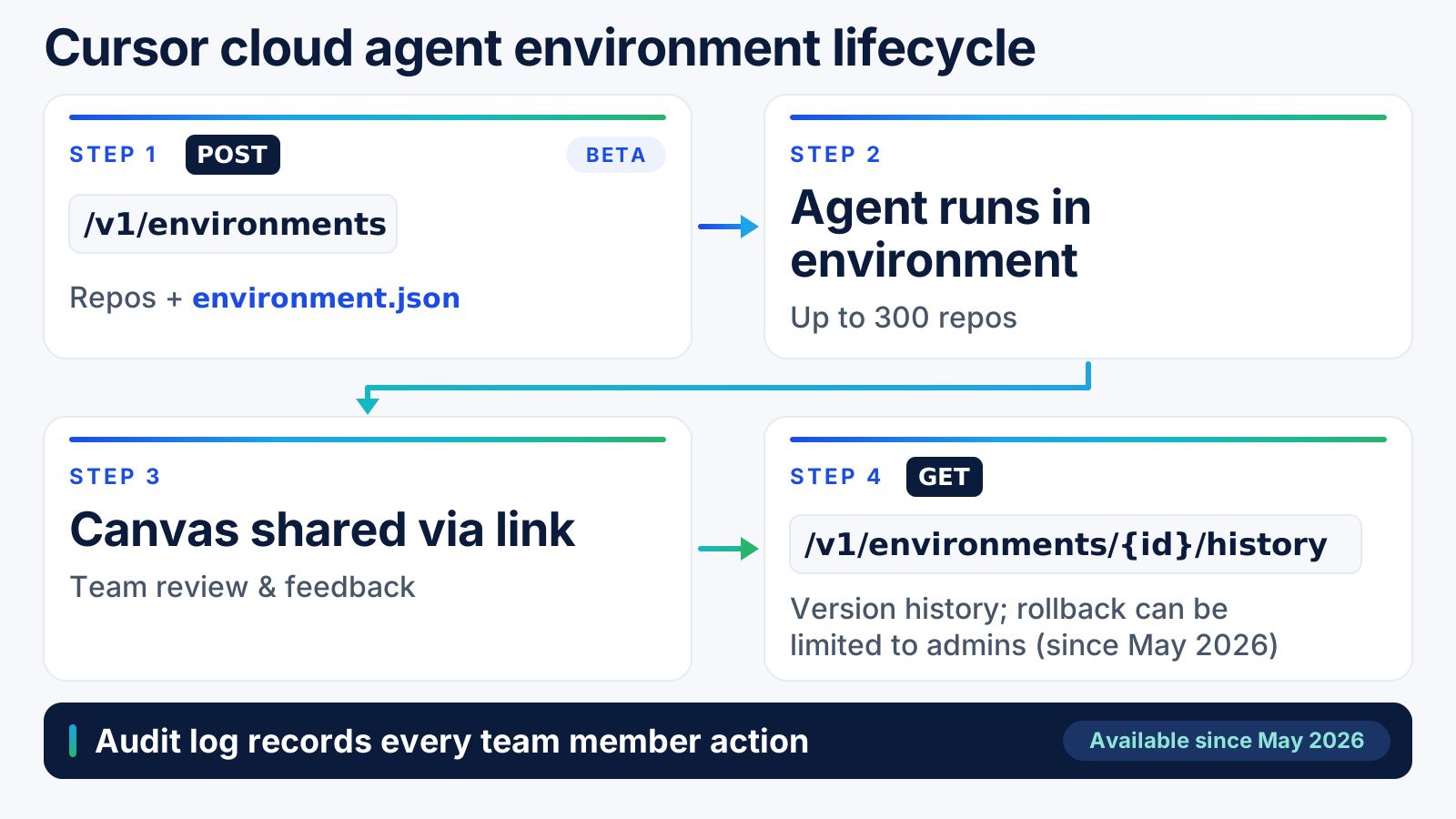
On October 16, 2026, Cursor opened up a beta API for the cloud environments its agents run in: create one, list it, read it, change it, delete it, all without opening the dashboard. Paired with it, a single environment can now hold up to 300 repositories and large environments load five times faster than before.
That's the new part. The governance controls that make a 300-repo environment safe to hand to an agent, audit logging, scoped secrets, admin-restricted rollback, shipped five months earlier, in May. This post covers both: what's new this week, and the controls your team should already know about before turning any of it on.
What did Cursor just ship for cloud agent environments?
Three things, all on October 16: an Environments API in public beta, canvases that a cloud agent can share with the team by link, and a jump to up to 300 repositories per environment with 5x faster loading on large ones. Source: Cursor changelog.
Before this, configuring an environment meant the Cursor dashboard or a .cursor/environment.json file in a repo. The API adds a third path: code that creates and edits environments the same way your CI pipeline creates a deploy target.
What can you call on the Environments API?
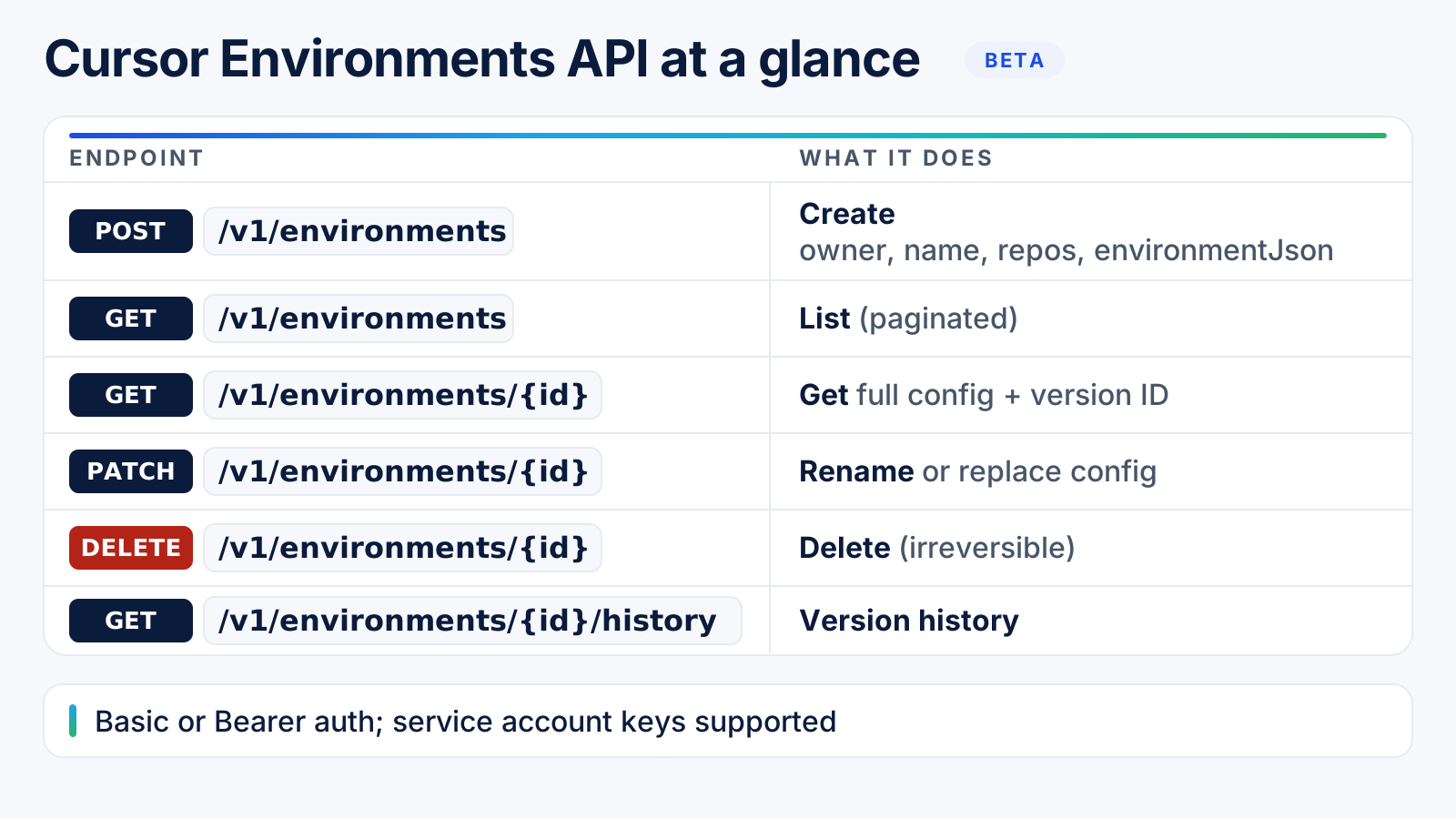
Six core endpoints cover the full lifecycle: create, list, read, update, delete, and read version history. The API also has build and secrets endpoints. Source: Cursor Cloud Agents API docs.
| Method & path | What it does |
|---|---|
POST /v1/environments |
Create an environment from owner (personal or team), name, repos (up to 300), and environmentJson |
GET /v1/environments |
List environments, paginated (20 per page by default, 100 max) |
GET /v1/environments/{id} |
Read the full config, plus the current versionId |
PATCH /v1/environments/{id} |
Rename the environment or replace its config |
DELETE /v1/environments/{id} |
Delete the environment; this is irreversible |
GET /v1/environments/{id}/history |
Read version history (created, updated, deleted, backfilled, changed) |
A few details worth knowing before you build against it:
- Creating a duplicate name returns
409 environment_name_conflict, so check for an existing environment before you retry a failed create. GET /v1/environmentsonly shows what the caller can see: a team admin sees every team environment, plus their own personal ones, but not a teammate's personal environment.- There are separate build endpoints (
GET /v1/environments/{id}/buildsand friends) for the Docker build that boots an environment, distinct from the environment config itself. - Auth is a Basic or Bearer API key. Service account keys work for team environments, which matters if you're calling this from CI rather than a person's own key.
How do multi-repository environments change what an agent can do?
One environment can hold every repository an agent needs for a task, and that environment is reused across sessions. This isn't new this week, Cursor shipped it May 13, 2026, but the Environments API now lets you provision it by code instead of by hand. Source: Cursor blog.
Before multi-repo support, a cloud agent working across a frontend repo and a backend repo needed two separate environments, with no shared context between them. A single environment spanning both means the agent can trace how a change in one repo affects the other, and test the result, without you stitching sessions together yourself.
What governance controls have Cursor cloud agent environments had since May?
These predate this week's release, but they apply to every environment you create through the new API, so they belong in the same checklist.
| Control (available since May 2026) | What it does | Who can change it |
|---|---|---|
| Audit log | Records every team member action taken on an environment | Read-only for the team; nobody turns it off |
| Scoped secrets & egress | Secrets and network egress set on one environment aren't reachable from any other | Whoever can edit that environment's config |
| Admin-only rollback | An optional setting that limits who can use version history to roll an environment back | A team admin turns the restriction on |
| Multi-repo environments | One environment can hold every repo an agent needs, reused across sessions | Whoever creates or edits the environment |
Dockerfile-based environments also get build-level security: build secrets are scoped to the build step and never reach the running agent, and cached builds run up to 70% faster when only the Dockerfile layers that changed need rebuilding.
Cursor's auto-generated environment config, where Cursor inspects your repos and writes a starting
.cursor/environment.jsonfor you, is still in private beta for Enterprise only. Everyone else writes or edits the config by hand.
What should a team lock down before using the Environments API?
Three settings are worth a five-minute check before anyone on your team calls this API in a script:
- Service account keys for team environments. Use a service account key for CI or automation calls, not a developer's personal API key, so access doesn't disappear when someone leaves the team.
- Secrets and egress scoped per environment. Confirm the environments your agents use don't share secrets with environments that hold different repos. This is the default behavior, but it's worth verifying on environments created before the scoping existed.
- Admin-restricted rollback, if your environments hold production-adjacent config. It only applies once an admin turns it on. If an environment can reach systems you'd rather not have rolled back by just anyone with access, turn the restriction on.
None of this is specific to the new API. It's the same checklist whether an environment was created by hand in the dashboard or by a POST /v1/environments call, because the controls live on the environment, not on how it was created.
Does this change what engineering leaders should track?
A beta API for provisioning environments is exactly the kind of change that quietly reshapes how a team uses a tool, some developers start scripting environment setup, others keep clicking through the dashboard, and the gap between them is easy to miss until a rollout stalls.
CloudByte AI's Cursor analytics tracks sessions, prompts, tokens and cost per developer and project, which is the layer that shows whether a change like this one actually changes usage, not whether the API itself is being called correctly. To be clear about scope: CloudByte AI doesn't create, configure or manage Cursor environments. That's Cursor's API and dashboard. We cover the usage and adoption side of the same rollout, which our AI governance tools page covers alongside the rest of your AI coding stack. If you're still building out that adoption baseline, our Cursor usage tracking guide and Cursor comparison page are the places to start.
Frequently asked questions
It's a beta API that lets you programmatically create, read, update and delete the cloud environments Cursor's cloud agents run in, instead of configuring them only through the dashboard. It supports up to 300 repositories per environment and authenticates with a Basic or Bearer API key, including service account keys for team environments.
Not yet. It's in public beta, open to use today, with general availability still to come. Cursor notes the API may change before GA, which makes now the right time to pilot it on a few environments, shape your scripts, and be ready to scale when it goes GA.
Yes, as an optional setting. Team admins can turn on a setting that limits environment rollback to administrators; until it's on, anyone with access to the environment can use its version history to roll it back.
Yes. An audit log records every team member action on an environment, including created, updated, deleted, backfilled and changed events, so security teams can see who changed what and when.
Yes. Since May 2026, a single environment can hold every repository an agent needs for a task, reused across sessions, so an agent can trace a change across repo boundaries instead of being limited to one.